
Bundle substitutions
Use a separate list of backups when the sold-out variant is sold inside a bundle.
Available on the Growth and Scale plans.
How it works
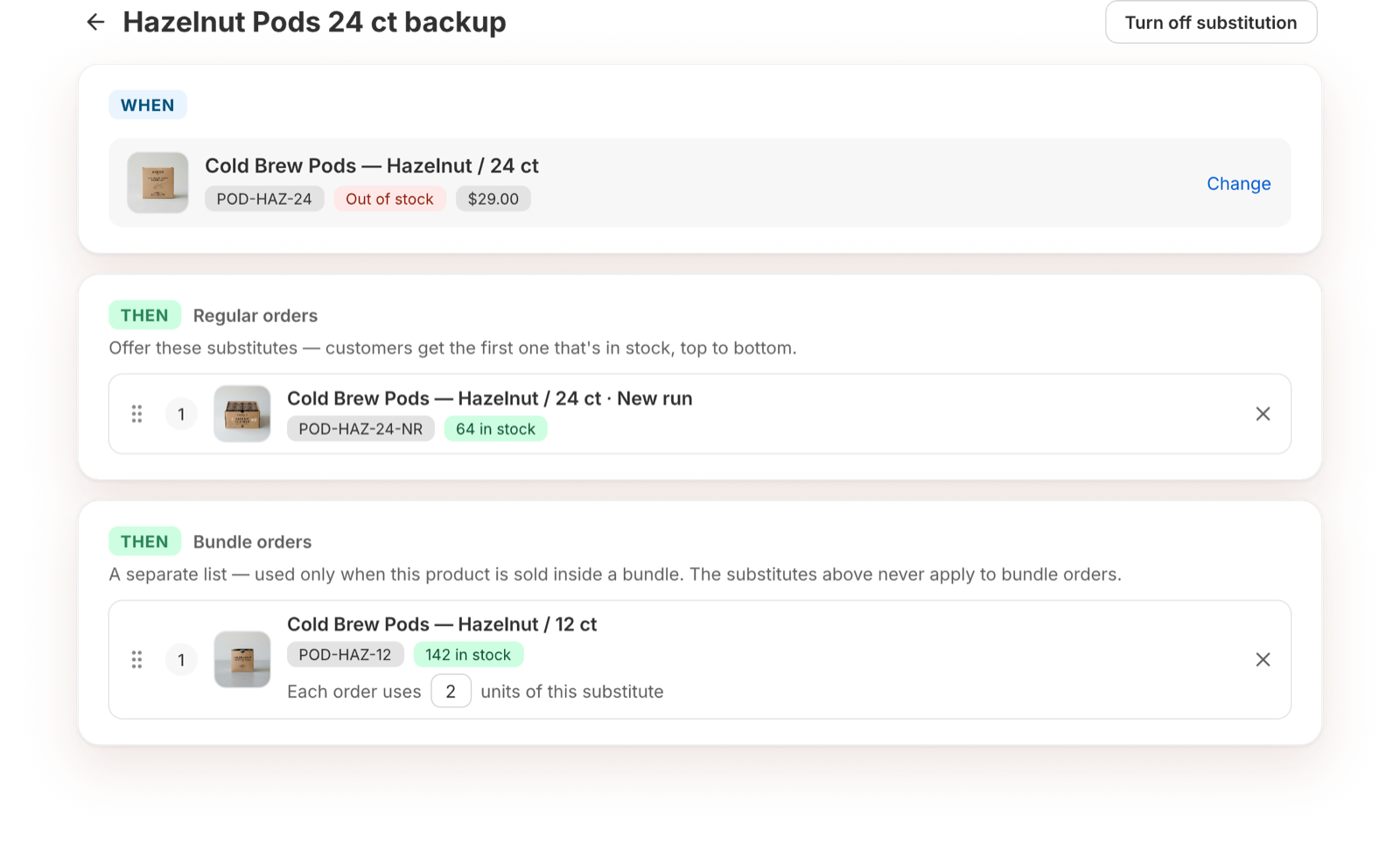
A rule can have two lists:
- Regular orders: used when the variant is bought on its own.
- Bundle orders: used only when the variant is part of a bundle.
The two lists are separate. Bundle orders never use the regular list, and regular orders never use the bundle list. Only the sold-out item in the bundle is swapped; the rest of the bundle ships as ordered.
Set it up
- Open the rule and add at least one substitute under Regular orders. Bundle substitutes work alongside your regular list.
- Under More options, turn on "Use a separate list when this product is sold inside a bundle."
- Under Bundle orders, click Add a bundle substitute and pick the backups.
Why a regular list is required
Turning on the rule lets the variant keep selling when it's out of stock. Shopify can't tell a variant sold alone from one sold in a bundle, so the variant keeps selling in both. The regular list makes sure orders for the variant on its own are covered too.